Monday, 9 December 2013

Hammer time!

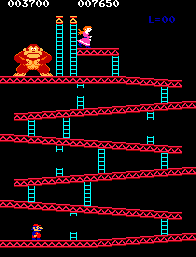
Again, weekends aren't the most conducive to working on Neo Kong, but I have managed to get the hammers coded up.

Ignore the sprite offsets, I'll fix them soon!

Perhaps a little more work than you'd expect just to display two hammers, but now we're getting into the meat of the code; objects (such as hammers) are represented by 14-byte data structures which are initialised in several stages from different data sources.

I've been doing my own reverse-engineering at this point because thus far I've encountered a few minor errors in the other disassemblies and have been thrown a little off course by them. I should note here that you can't really fault them - it's one thing to comment a disassembly and another thing altogether to actually re-write every single instruction for another CPU! It takes me a little more time but I guess it's worth the independent verification- though it's not something I'll need to do for every instruction as once the data structures are identified, the rest of the code should fall out quite easily.

And this is way too premature, but I've also been thinking of my next porting project... and I think I've got a candidate that is perhaps a better fit to the Neo Geo than Donkey Kong.

Saturday, 7 December 2013

Even more spritely!

Not a lot of time on the weekends, but a little more progress..


Fixed a bug in the tilemap render routine that was cutting off the top row when rotated. Now you see the 1UP and HIGH SCORE text, which was absent from the last screenshot. Oh and the sprites aren't scaled yet, so the placement was never going to be right, but they're approximate atm.

I've been working on the level/game-play initialisation routine, which as you can imagine is not trivial. The background renders are done, as I mentioned, in a generic routine with a 2nd level-specific routine. Then all the game-play data is initialised, including sprite positions. Here each level has its own sprite initialisation routine as well, which is where Kong's barrels, the oil barrel and hammers (not ported yet) are done. You might also notice a couple of errant ladder tiles at the top of the screen are now missing - for some unknown reason black sprites are used to cover them!?!

I'll probably spend the time now and complete all the sprite routines for the other levels, since they are tightly coupled to other in-game data structures like the fireball locations. Then at least I can see all screens in their entirety and maybe even at least start to run them in attract mode. So Mario will have to wait a little longer before he can run!

There's life, Jim!

The wife went out for dinner so I got to play some more. Still haven't sorted the sprite placement properly, but in rotated mode, at least these look right with fudge factors.

Attract mode, Kong, Pauline & Mario
I've skipped the code to draw level-specific sprites (oil barrel etc), so I'll probably go back now and do that. Maybe, just maybe, it won't be too long before Mario moves!?!

Friday, 6 December 2013

Let there be sprites! And when X=Y...

I've got the 1st sprites showing in Donkey Kong - Kong himself on the title page.

Now with added sprites - albeit in the wrong location

You will, no doubt, notice that the sprites are not in the right location - more about that later...

But first, after hooking up the palette to the sprites, I discovered that the bitplanes were reversed in the Donkey Kong sprite ROM's w.r.t. the tilemap ROM's... something that may simply be a 'bug' in MAME as the ROM's are organised in the driver arbitrarily to some extent. Either way, a simple fix to my conversion tool and I was up-and-running with correct colours just a minute or so later.

In the process I fixed a bug (which was disabled anyway) in my tilemap rendering routine and did a few minor optimisations. I'm still not convinced that a complete rendering of both tilemap and sprites every VBLANK is going to cut it on the final version, but gee it'd be nice - very nice - if it did!

So, about those sprite locations; stepping back a bit the whole X-Y issue has been somewhat clouded from the beginning, given that the display on the Donkey Kong cabinet is rotated 90 degrees. I've referred to coordinates as 'X' & 'Y' and also referred to 'rows' and 'columns' throughout my commented disassembly and, to be honest, I'm not sure I haven't been inconsistent in some areas. And whilst it's easier to think about Mario's X coordinate changing as he runs across a girder, it is in fact his sprite's Y coordinate that is changing in the hardware. And of course, a row of text spanning multiple columns is actually a single column of text on the display spanning multiple rows. So what convention do you choose, and how do you make it clear? My brain started hurting right about now.

So when mapping all this to the Neo Geo hardware, it complicates the issue. And to make matters (much) worse - at least where sprites are concerned - it's not a nice 0-N range on one/both axes on either hardware platform! The sprite rendering code in MAME, for example, looks like a veritable dog's breakfast, somehow involving the current scan line! Arrggh! And of course, supporting both orientations means I have to solve the problem twice. If my brain was hurting before, it's throbbing now!

As a result, thus far I've managed to place the sprites somewhere on the screen for now.

To be honest, I haven't decided my plan of attack from here (sprite coordinate issues aside). I'll have to take some time to study the uncommented areas of code to work out how best to proceed. Ideally, it'd be nice to get Mario running and climbing, without the distractions/complications of timers, barrels and fireballs, and possibly easier to understand the sprite coordinate issues. Having said that, I have no idea at this stage what proportion of the remaining code would need to be ported to achieve that.

To give some very vague idea of what I've done so far, the PDF listing from IDA is approximately 80 pages of code. But that can be rather verbose with comment lines between functions, and added lines for cross-references - let's say 20%, so maybe 60 pages of Z80 code. My main.68k file, which contains (mostly) non-Neo Geo specific code, is currently 8 pages of code. However, operations can be done rather more efficiently in 68K code, so I'm going to estimate that would represent at least 10 pages of Z80 code. Using these very rough figures, I might say that I've ported about 1/6th or 17% of the code; doesn't sound like much when you put it like that. But there is an awful lot of 'grunt work' code remaining - code that will simply be a matter of turning the handle. Tedious but straighforward.

Wednesday, 4 December 2013

Sprites

Tonight I converted the Donkey Kong sprites to Neo Geo format.

Next task is to write the sprite rendering code for the Neo Geo. In theory DK has two (2) banks of 128 sprites, although according to MAME only 16 sprites are visible on each line. Regardless, from what I've gleaned from the code thus far, nowhere near that many are actually used. For now I'll need to devise some algorithm for selectively displaying only those sprites that are actually used. Ultimately I'll probably rationalise and condense the sprites that are used on the 68K port.

Tidy-up, bug fixes and the GCW-ZERO

I decided to give my 68K code a once-over before I move onto sprites; fill in any missing functionality in the execution path of the attract mode that I've already commented but not ported.

In the process I fixed a few minor bugs; the score and high-score display routines were always showing "000000", and the palette for the conveyor/cement level was wrong.

I also decided to finish off commenting and porting the level background rendering routines, which were decidedly simpler than the girder and ladder drawing routines; each level is a mixture of generic and special-case routines, the latter being simpler to reverse-engineer. As a result, here are the four levels as rendered before any sprites are added:

All 4 screens, fully rendered before adding sprites
I really am at the stage now where I need sprites to see what is happening in the code. Again, the conversion to Neo Geo sprite format should be straightforward, and shouldn't take me more than an hour or so. Then I need to write the sprite rendering routines for the Neo Geo hardware. One interesting aspect of the Donkey Kong hardware is that the sprite registers are shadowed in ordinary RAM and then DMA'd to the hardware registers each VBLANK interrupt. That actually makes my job really easy (for the initial implementation) as I can essentially do the same (although I'll be using the CPU to move the data). It's not necessarily how I'll implement the final version, but again, makes it very easy to debug and also rotate the screen!

I do have a particular issue with sprite placement due to the fact that I'm scaling the tiles (Neo Geo sprites) to fit the entire Donkey Kong screen on the Neo Geo display, but I'm pretty sure I have a solution for that issue.

As an aside, I received my GCW-ZERO yesterday and have spent a bit of time installing emulators - including the Neo Geo of course - and playing a few things. Whilst the emulations themselves are excellent, and the screen is nice and bright, the build quality is absolute, complete and utter GARBAGE! The controls are so horribly crappy and sticky, it's almost unusable. I'm not sure what my options are given that it's a Kickstarter project, but I'm sure as hell not happy about it! Consider this a Public Service Announcement.


Monday, 2 December 2013

Every man and his dog...

It seems Donkey Kong is a ripe candidate for (commented) disassembly - I now know of possibly three (3) disassemblies which would make mine the 4th!

The first as I mentioned is Sockmaster's listing, created when he ported it to the 6809-based TRS-80 Color Computer (aka Coco). The 2nd I learned about only yesterday, Jeff Kulczycki's listing, created when he added the 5th Foundry level. AFAIK this listing hasn't been released in the public domain. The 3rd I discovered today on the Donkey Kong forums; a reasonably comprehensive disassembly from what I've seen so far.

With all these available you may wonder (as do I) why I'm bothering to do my own. You can be certain I will be using all the information from the latter, just as I have Sockmaster's, but even that is lacking in some key areas I've already encountered. For example, the code to draw the levels is relatively uncommented (save for rather pointless comments such as 'subtract 10 from A'). So I will be taking everything available, verifying it to my own satisfaction, and merging it into my own IDAPro disassembly. Ultimately I aim to have the most comprehensive disassembly, and I should be able to generate fully-relocatable Z80 code (alongside my 68K port of course).

For instance, tonight I have been working on the aforementioned code that draws the levels, and thus far have deciphered the routines for drawing girders and ladders. The rest of the draw routines should follow quite easily from here. I suspect Jeff has managed to do as much (as he added a 5th level) but no-one else seems to have done so before.

But enough words and more eye-candy. The attract mode now cycles through all three screens, but of course the game-play demo is currently a static, tilemap-only, rendering.

The Neo Geo cycles through all 3 in attract mode

On par with the disassembly, I have coded the girder and ladder drawing routines, and made use of the ability to specify any level for the attract mode. The results vary from level-to-level, but it's a good indication that I've got these routines working correctly.

The 4 levels, girders and ladders only

And that's about as far as I'm going to get without any sprites. So it's back to my ripping software to convert Donkey Kong's sprites to Neo Geo format; nothing too different than the tiles so I'm expecting that to be a straightforward process. Then I can get Kong rendered on the title screen, before the infinitely more daunting task of delving into the game-play (attract mode).